
How to Upscale Confidential Images Safely
To upscale confidential images without handing them to anyone, use an upscaler that runs on your own device, so no copy of the file reaches a third party. If you use a cloud upscaler instead, the provider receives your client's photos, and under the GDPR that makes it a processor you need a written contract with before the first upload.
This matters for photographers, agencies, HR teams and law firms, who hold images they promised or are required to keep to themselves. This is a practical guide, not legal advice. Your NDA, your client contract and your national regulator have the final word.
When a client photo counts as personal data
The GDPR defines personal data as "any information relating to an identified or identifiable natural person". A portrait qualifies. So does a crowd shot where one person can be recognized, a scan of a passport, a car photo with a readable plate, or a ward photo in a hospital.
A photograph is not automatically "special category" data. Recital 51 says photographs are covered by the biometric definition only when processed "through a specific technical means" that allows unique identification of a person. Plain enlargement doesn't identify anyone, but the file is still ordinary personal data, and the GDPR defines processing as any operation on it, "whether or not by automated means". Upscaling counts.
What a cloud upscaler becomes in your paperwork
If you send the file to a hosted service, that service is processing personal data on your behalf. The GDPR calls it a processor and you the controller. The European Data Protection Board's Guidelines 07/2020 set two tests: a separate entity, processing personal data on the controller's behalf. A cloud upscaler passes both, and the guidelines' own cloud storage example reaches the same result, even for a take-it-or-leave-it standard service.
That has consequences you can't skip:
- Article 28(1) says you may use "only processors providing sufficient guarantees" of appropriate technical and organisational measures.
- Article 28(3) requires a contract or other legal act, including that the processor acts "only on documented instructions" from you, covering transfers to a third country.
- If the provider's servers or sub-processors sit outside the EU, Article 44 lets the transfer happen only when the conditions of the transfer chapter are met.
Most free online upscalers publish a privacy policy, not a data processing agreement. A policy is a unilateral statement. It doesn't give you documented instructions, and it can change without asking you.
Where an NDA bites
An NDA is a separate problem and often the stricter one. Many restrict disclosing confidential material to any third party without consent, and an upload to a vendor is a disclosure to a vendor. Whether a transient upload counts depends on the exact wording, so read yours for terms like "third party", "service provider" and "subcontractor". If the wording is unclear, ask the client before you upload, not after.
Uploads also carry more than pixels: a photo's embedded metadata can include GPS coordinates, device serials and timestamps, and all of it goes along with the file. For the general upload risks (retention, model training, sharing), see the risks of uploading photos to online upscalers.
The on-device route
The cleanest fix is to remove the third party. If the file is enlarged inside your own browser, by your own graphics card, there is no copy on someone else's server, no processor to contract with and nothing to disclose.
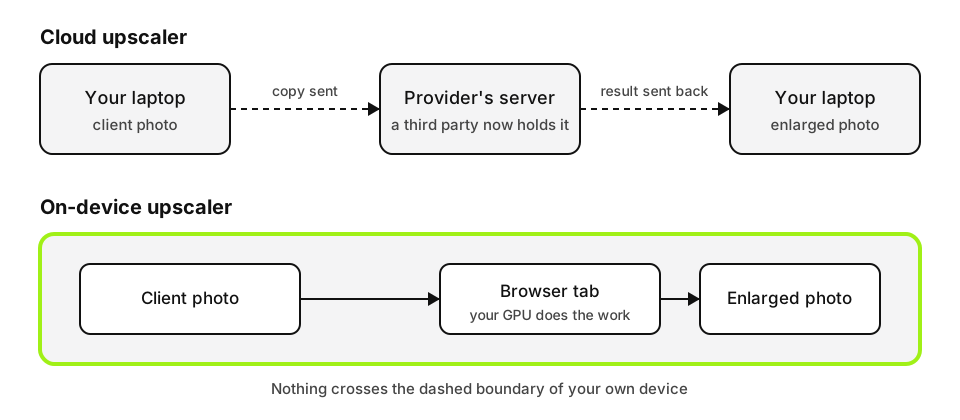
You can upscale the files without them leaving your device in the free tool here. It runs through WebGPU in current Chrome, Edge, Safari 26 and Firefox 141 on Windows, and handles JPG, PNG, WebP and AVIF up to 20 MB. How browser-based processing works explains the mechanics.
Don't take that on trust, even from us, when a client's file is involved. Before the first real job, open the browser's developer tools, switch to the Network tab, run a dummy photo through and look for an upload request the size of the image. You won't find one. Then save a note of the check for your records, which is the kind of evidence a client or auditor may ask for.
What on-device doesn't fix
Keeping the file local removes the transfer. It doesn't remove your other duties.
- The upscaled result is still personal data on your machine. Storage, access, encryption and deletion are on you, as is the retention period in your client contract.
- Browser extensions can read pages and files, and a shared or unmanaged computer is an exposure of its own. Use a clean profile or a managed machine for sensitive jobs.
- Devices without WebGPU fall back to a slower mode that still runs locally. Large originals over 2048 px on the long edge are reduced before upscaling (1024 px on iPhones and low-memory devices), so very large scans may need cropping first.
- Upscaling adds plausible detail, not recovered fact. Don't treat an enlarged face or plate as evidence of who or what was in the frame.
If your policy is "client files never leave our machines unless the client says yes in writing", put that sentence in your intake checklist and choose tools to match it. For a one-off job under NDA, an on-device upscaler is the option that needs no new paperwork.
Ready to try it yourself? It's free, and your files never leave your device.
Try the free AI image upscaler