
How to Upscale Product Photos for Ecommerce
Most supplier photos are 600 to 800 px on the long side, and that is below what Etsy and Shopify recommend. A 700 px photo needs about 2.9x to reach 2,048 px, so the practical move is to upscale it 4x and resize the result down to the exact size the marketplace wants. For Amazon's zoom threshold of 1,000 px, 2x is enough.
Here are the numbers, read from each marketplace's own help page where one is public, and what to watch for before you hit upload.
What each marketplace asks for
Sizes below are the long side unless noted. The chart shows how far apart the figures are.
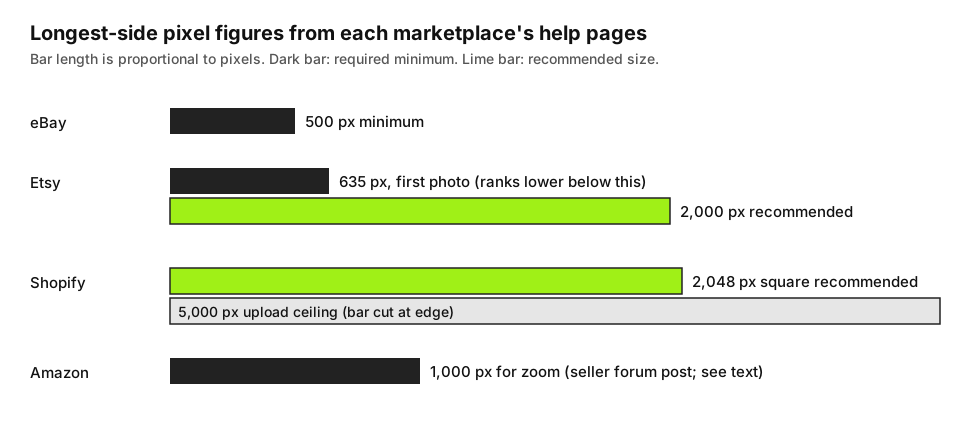
- eBay: photos must be at least 500 pixels on the longest side. The policy page gives no larger target. Third-party guides say zoom starts at 1,600 px, but eBay's page doesn't say that, so treat it as a rule of thumb.
- Etsy: listing photos should be at least 2,000 px wide and tall, and the first photo at least 635 px each way to avoid ranking lower in search. Etsy also warns that files over 1 MB may not finish uploading on a slow connection.
- Shopify: 2,048 x 2,048 px usually displays best for squares. Anything up to 5,000 x 5,000 px (25 megapixels) and under 20 MB is accepted.
- Amazon: the help pages sit behind a Seller Central login, so we couldn't read the current page. An Amazon-run seller forum post lists a minimum of 1,000 px on the longest side for zoom. Many guides say 1,600 px or more gives a better zoom, and we couldn't confirm that figure at the source. Check Seller Central before you batch-process a catalog.
Two things follow. Meeting a minimum only avoids a rejection; the recommended sizes are what make zoom look good on a laptop. And the same file can serve all four, so aim at the biggest recommendation you need: 2,048 px.
Pick the scale from the numbers
The scale is the target long side divided by the source long side, rounded up to what the upscaler offers (2x or 4x).
| Supplier photo | Target | Ratio needed | Scale to use | Then |
|---|---|---|---|---|
| 600 x 600 | 1,000 px (Amazon zoom) | 1.7x | 2x (1,200 px) | Resize down to 1,000 or keep as is |
| 700 x 700 | 2,048 px (Shopify) | 2.9x | 4x (2,800 px) | Resize down to 2,048 |
| 800 x 600 | 2,000 px wide (Etsy) | 2.5x | 4x (3,200 x 2,400) | Resize down to 2,000 x 1,500 |
| 400 x 400 | 2,048 px | 5.1x | 4x (1,600 px) | Falls short; see the limits below |
Shrinking a 4x result is safer than stretching a 2x one that came up short, since the enlargement is the step that adds detail and the shrink only removes it. Why 2x is usually enough covers when the smaller factor wins; for listing photos, take 4x whenever 2x leaves you under the recommended size.
The steps
- Find the original. If you have the supplier's file, use it, not a screenshot or the thumbnail on their site. Compression artifacts get enlarged along with everything else, and how to keep an enlargement clean explains why you want the least-compressed copy.
- Upscale before you edit. Do the enlargement first, then crop, adjust color and compress for upload. If you crop a 700 px photo to a tighter square and upscale after, you spend your pixels on the crop instead of the whole frame.
- Upscale the supplier photo in your browser. Drop it into the image upscaler, pick 4x, and save the PNG or JPG. The photo is processed on your device and never uploaded, which matters if the file is a supplier's under an agreement. Transparent areas are flattened onto white, which suits an Amazon main image or a plain listing, but if you need to remove the background you'll do that separately.
- Resize to the target. Use any editor to scale the result down to 2,048 px (or whatever you chose). The upscaler doesn't resize to a custom size.
- Export for the marketplace. JPG at quality 85 to 90 is a sensible starting point for a product shot. Shopify's limit is 20 MB, which a 2,048 px JPG won't approach. For Etsy, check the file size: a detailed 2,000 px photo can pass the 1 MB mark Etsy warns about, so lower the quality a few points until it fits.
The tool accepts source images up to 2,048 px on the long side (1,024 px on iPhone and iPad), so a large original gets scaled down before it's enlarged. That is rarely an issue for supplier photos, but it is for a 4,000 px camera file: you don't need to upscale that one at all.
White backgrounds and why order matters
Amazon wants a pure white background on the main image, and listing platforms generally reward clean, even backgrounds. Upscaling a photo with a slightly grey or gradient backdrop enlarges that gradient too, so check the background at 100% afterward and correct it in your editor. Compress last: every JPG save throws away a little detail, and marketplaces recompress on upload as well, so upload the highest-quality version that fits the size limit.
Where upscaling stops helping
AI upscaling rebuilds plausible detail. It can't read text that was never legible. A few cases where you should not trust the result:
- Small printed text and logos. A 12 px ingredients panel or a brand mark on a 600 px photo will come out as clean but possibly wrong letterforms. For a regulated product, wrong text is a listing problem. Compare the output against the real packaging.
- Fine repeating texture. Knit, mesh and woven fabric can pick up an unnatural, too-regular pattern at 4x. Zoom to 100% and look at it before you publish.
- Jewelry and glossy products. Specular highlights and engraved detail are the first things to look invented.
- Anything 400 px or smaller. The 400 px row in the table above is the point where the gap between what you have and what the marketplace wants is wider than a single upscale closes. You can run it twice, but each pass drifts further from the product.
If the product's selling points are in the details (stitching, a texture, a finish), a reshoot beats an upscale. A 12 megapixel phone photo taken in daylight near a window already holds more real detail than a 600 px supplier image, and it clears all four size lists above without any enlargement. Keep upscaling for catalog backfill, old listings and supplier files you can't replace.
Ready to try it yourself? It's free, and your files never leave your device.
Try the free AI image upscaler