
Is It Safe to Upload Videos to an Online Upscaler?

It depends on the service, and the answer is in its privacy policy rather than on its homepage. A cloud video enhancer has to copy your file to its servers, so the real questions are how long that copy lives, who else can touch it, and whether it feeds an AI model. The three policies we read below answer those differently, and none of them says "we delete it the moment we finish."
Videos raise the stakes more than photos do. For the photo version of this question, what happens to a photo you upload covers retention basics; this post covers what changes when the file is a clip.
Why video is a bigger exposure than a photo
A photo is one frame. A clip is thousands, and each frame can show a face, a street sign or a screen. A 30 fps video has 1,800 frames per minute, so a single five-minute family clip holds 9,000 frames of the people in it, plus their voices.
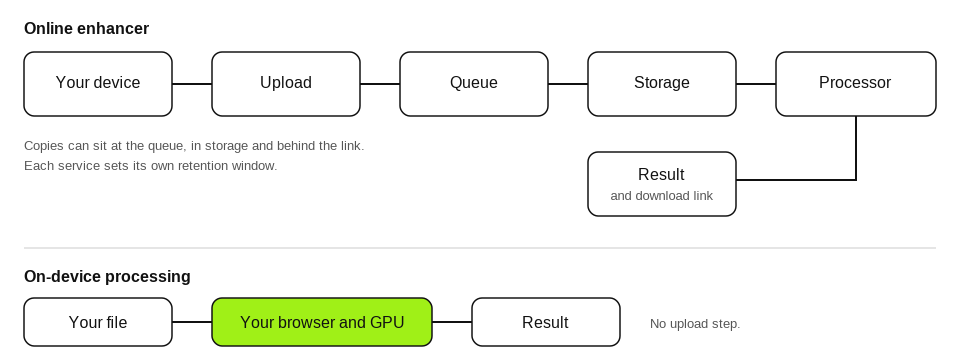
Size matters too. At 8 Mbps, a common bitrate for 1080p, five minutes is about 300 MB (8 megabits × 300 seconds ÷ 8 bits per byte). A file that size is slow to upload, so services keep it in a queue and often in storage while it waits for a processor, and they keep the result for a while so you can download it. Each stop is a place where the file sits on someone else's disk.
The footage itself is often the sensitive part. Home videos show children. A recorded meeting can show customer names and numbers; a screen recording can show an inbox, an address bar or a banking page for one frame. The person asking "is it safe?" usually knows which of these their clip is.
What three real policies say
We read the policies of three services that process uploaded video in the cloud (Kapwing, HitPaw and VEED) and quote what the text says. They describe different products and were read in November 2026; policies change, so check the current page before you rely on any line.
Kapwing says deleted content is "permanently removed from viewing and public access immediately and removed from our servers within 7 days" (privacy policy). Its security FAQ says "Customer data deleted after 30 days" and "Kapwing does not train AI models on customer content or customer personal data." The same FAQ says anyone with the unique ID of an unlisted project can view it. Kapwing's sub-processor page lists Google Cloud Platform for video storage and processing and a long list of AI vendors by task, including OpenAI for video generation and a Hong Kong provider for background removal. Whether your clip reaches those vendors depends on which feature you use, and the policy does not say.
HitPaw's video enhancer app policy says that for video features "the video file is encrypted and uploaded to a third-party server for processing." It also says the system deletes all related data "seven (7) days after processing" and that the data is "not stored or backed up in any form," and that processing "will not be used for model training." The third-party providers have their own terms, which the policy points to rather than restating.
VEED's privacy policy says "Development and Improvement Processing" includes "training and developing any relevant artificial intelligence models," and that it applies to content uploaded under a free subscription (with an exclusion for content from its mobile apps). Free-tier users who opt out "cannot continue to use our Applications under that 'Free' tier." On retention it says only that it keeps personal data "for as long as reasonably necessary." Its providers are listed on a separate sub-processor page, and many are outside the UK and EEA.
Read side by side, the windows run from 7 days to "as long as reasonably necessary," and the AI-training answer depends on the plan you are on. Two of the three policies do not say whether deleted files also leave backups. Only HitPaw's says no backup copy exists.
None of this means these services mishandle files. It means a policy is a promise you cannot check, and the promise changes with the plan, the feature and the vendor behind it.
Five questions to ask before you upload a clip
- How long is the file kept, and does that include backups? "Deleted within 7 days" and "not backed up in any form" are two different statements. You want both.
- Is my footage used to train a model, and does that depend on my plan? A free tier that trains and a paid tier that does not is common enough to check for.
- Who else processes it? A sub-processor list, or a clause saying the file goes "to a third-party server," means the real recipient may be a company you never heard of, in another country.
- Who can open the result link? An "unlisted" link that anyone holding the address can view is not private. Look for links that expire or need a login.
- Do I have the right to send this file? A client's recording, a meeting with other people in it or footage covered by an NDA may not be yours to upload. Client work has its own rules that sit on top of whatever the service promises.
If question 1 or 3 has no clear answer in the policy, treat the answer as "longer than you would like, with more parties than you expect."
The other option: keep the file on your device
An upscaler that runs in the browser does the work on your own GPU, so there is no queue, no storage copy and no download link to expire. How on-device processing works explains the mechanism. The FreeUpscaler video tool works this way: the clip is processed in your browser and is not uploaded.
You can verify that instead of trusting it. Open your browser's developer tools, go to the Network tab, run an upscale and look for any request that carries the file. There should be none. The tool's own privacy page describes what the site does collect, such as error reports, so read it for the full picture.
On-device has costs. AI upscaling needs a browser with WebGPU; without it the tool only does a basic resize, and it says so on screen. The input is limited to 150 MB and 5 minutes of processed video (the 300 MB clip above would need a shorter cut), and a long clip on a slow GPU takes a while. If the clip is longer than that, trim it first, or accept that a cloud service is the only route and run it through the five questions above.
For the clips that matter most (a funeral, a child's first steps, a client call), pick the on-device route first and keep the cloud service for footage you would be comfortable seeing on a public link.
Ready to try it yourself? It's free, and your files never leave your device.
Try the free AI video upscaler